1. Introduction
The Memory Unit (MU) is an essential component of a computer. It stores data, instructions, and information for processing. Without memory, a computer cannot operate because the CPU relies on it to fetch and store data.
Definition:
The Memory Unit is a hardware component that temporarily or permanently stores data, instructions, and results in a computer system.
2. Functions of Memory Unit
- Stores input data before processing
- Stores instructions for the CPU
- Stores intermediate results during processing
- Stores final output for display or future use
- Provides fast access to CPU for smooth operation
3. Types of Memory
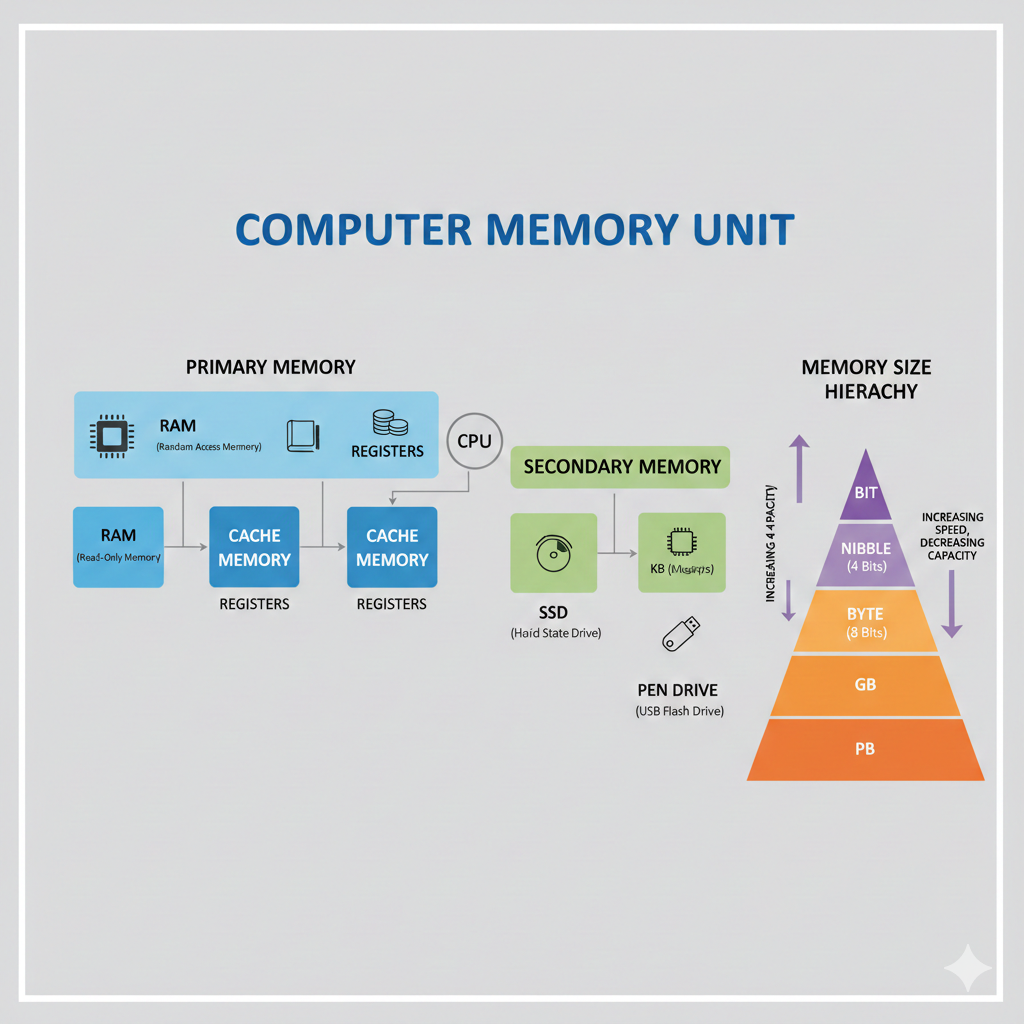
Memory in a computer is broadly divided into Primary Memory and Secondary Memory.
3.1 Primary Memory (Main Memory)
Primary memory is directly accessible by the CPU. It is fast but usually expensive and volatile (loses data when power is off).
Types of Primary Memory:
- RAM (Random Access Memory)
- Volatile memory
- Stores data temporarily during execution
- CPU can read and write
- ROM (Read-Only Memory)
- Non-volatile memory
- Stores permanent instructions like BIOS
- Cannot be modified during normal operation
- Cache Memory
- Very fast memory between CPU and RAM
- Stores frequently used instructions and data
- Reduces CPU waiting time
- Registers
- Small, high-speed storage inside the CPU
- Temporarily stores data during processing
3.2 Secondary Memory (Auxiliary Memory)
Secondary memory is used for permanent storage. It is slower than primary memory but has large capacity.
Examples:
- Hard Disk Drive (HDD)
- Solid-State Drive (SSD)
- Pen Drive / USB
- Optical Discs (CD, DVD)
3.3 Tertiary and Off-line Storage
Used for backups and archival purposes. Examples include:
- Magnetic tapes
- Cloud storage
- External hard drives
4. Memory Units (Bit, Byte, KB, MB, etc.)
Memory in a computer is measured in binary units. The basic unit is a bit, which represents 0 or 1.
| Unit | Abbreviation | Equivalent in Lower Unit |
|---|---|---|
| Bit | b | – |
| Byte | B | 1 Byte = 8 Bits |
| Kilobyte | KB | 1 KB = 1024 Bytes |
| Megabyte | MB | 1 MB = 1024 KB |
| Gigabyte | GB | 1 GB = 1024 MB |
| Terabyte | TB | 1 TB = 1024 GB |
| Petabyte | PB | 1 PB = 1024 TB |
| Exabyte | EB | 1 EB = 1024 PB |
| Zettabyte | ZB | 1 ZB = 1024 EB |
| Yottabyte | YB | 1 YB = 1024 ZB |
Note:
- Nibble = 4 bits
- Byte = 8 bits
- This table is essential for understanding computer storage and memory calculation.
5. Differences Between Primary and Secondary Memory
| Feature | Primary Memory | Secondary Memory |
|---|---|---|
| Accessibility | Directly by CPU | Indirect / via I/O |
| Volatility | Volatile (except ROM) | Non-volatile |
| Speed | Very Fast | Slower than primary |
| Cost | Expensive per MB | Cheap per MB |
| Capacity | Limited | Large |
| Examples | RAM, ROM, Cache, Registers | HDD, SSD, Pen Drive |
6. Importance of Memory in a Computer
- Stores operating system, programs, and data
- Ensures fast processing by CPU
- Helps in multitasking by temporarily storing data
- Necessary for permanent storage of files, applications, and backups
✅ Conclusion
Memory is a vital part of computer architecture. It determines the speed, efficiency, and storage capacity of a computer. Understanding types of memory and units helps in computer studies, software development, and IT education.